v1.6.0
Codelegate has a new visual rhythm. The whole app has been redrawn around deep navy surfaces, sage accents, and layers that make each pane easier to read without piling on more chrome. Underneath that fresh coat, long-running sessions now stay lighter too: terminal output is kept from outrunning the renderer, and background terminals give memory back when they are out of view.
Download Codelegate v1.6.0 here
A Fresh Look, Built in Layers
The interface no longer feels like one flat sheet of dark UI. The sidebar, main pane, pickers, and dialogs now sit on distinct surfaces, with subtle borders, shadows, and recessed controls separating one layer from the next. A Nippon-inspired palette brings deep navy and muted sage together, giving the app more character while keeping the focus on your work.
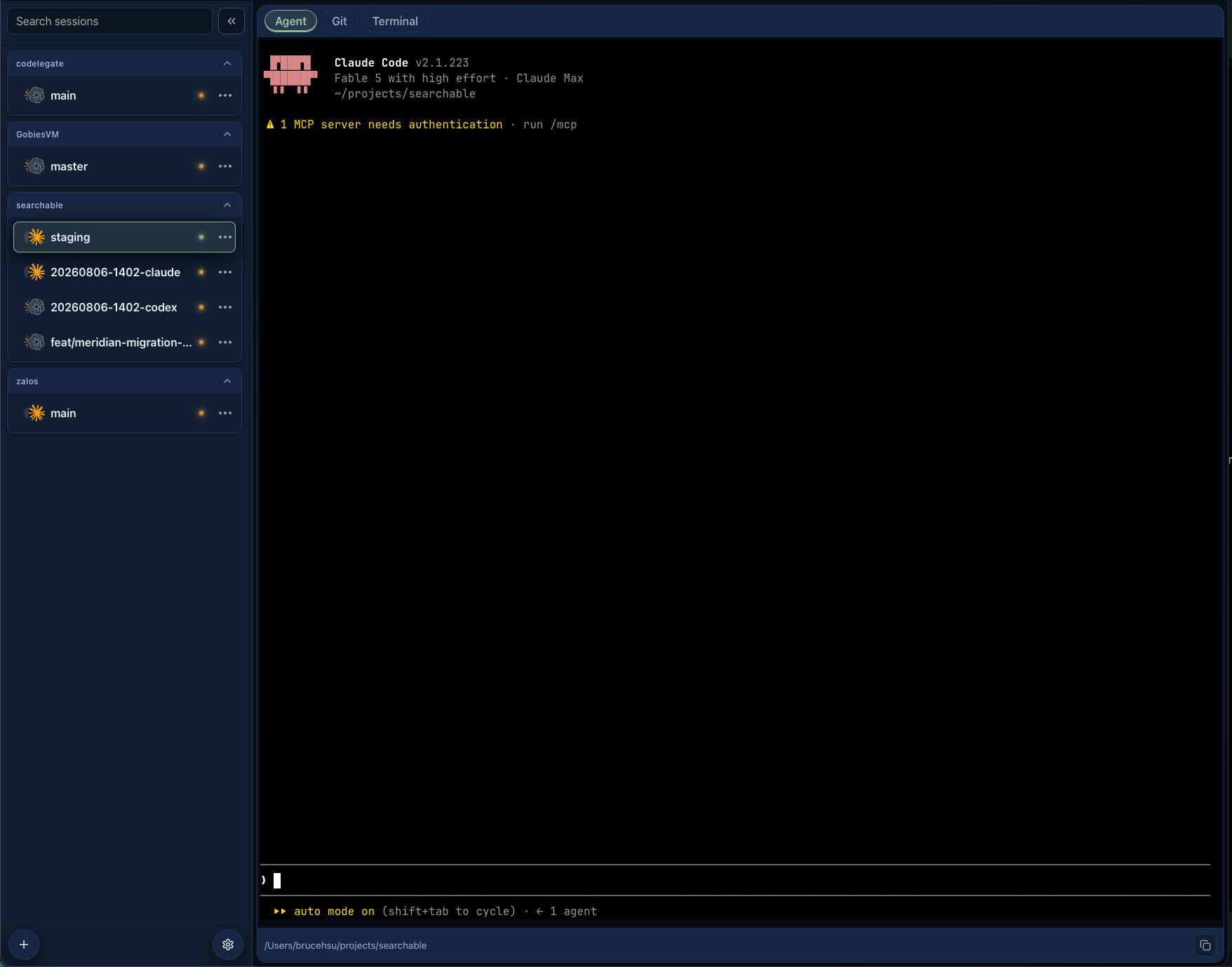
The new system reaches into the details too. Controls share a calmer, more consistent density; Git diffs use clearer additions, deletions, and file states; and the terminal sheds excess framing so the CLI gets more room. Codelegate now commits to one cohesive dark theme, with near-black terminal surfaces left untouched for familiar contrast.
Long Sessions That Stay Steady
Leave an agent running for hours and a lot can move through its terminal. Codelegate now paces the handoff between the native process and the terminal renderer, so output cannot keep piling up faster than the interface can consume it. Active terminals still retain generous history, while terminals sitting in the background automatically slim down.
Switch back and the terminal returns to the position you expect, even after old lines have been cleared away. Large Git diffs also release rendering data as you move on, and overscroll is kept inside the app instead of pulling the window into macOS rubber-banding. Together, those changes keep a busy workspace more responsive over a long day.
Other Improvements
- The sidebar collapse button now lines up cleanly with the search field.
v1.6.0
Codelegate 換上了一套全新的視覺語言。整個介面以深藍底色、鼠尾草綠點綴與更清楚的層次重新描繪,讓每個面板更容易辨認,卻不會因此堆上更多干擾。這次更新也不只停留在外表:長時間運作的 session 現在能更妥善地控制 terminal 輸出與背景記憶體,放著 agent 跑上好幾個小時也更輕盈。
層次分明的全新介面
介面不再像一整片攤平的深色畫布。側邊欄、主要面板、選擇器與對話框現在各自落在分明的表面上,再以細緻的邊線、陰影與內凹控制項拉開前後關係。靈感來自日本傳統色的深藍與柔和鼠尾草綠,替 Codelegate 添上一點個性,同時把注意力穩穩留在手上的工作。
這套設計也一路延伸到細節。各種控制項有了更沉穩一致的密度,Git diff 裡的新增、刪除與檔案狀態更容易分辨,terminal 周圍多餘的框架則被收起來,把空間真正還給 CLI。Codelegate 也從這個版本起專注在一套完整的深色主題,terminal 依然保留熟悉的近黑背景與清楚對比。
長時間運作依然穩定
agent 一跑就是好幾個小時,terminal 裡往往會流過大量輸出。Codelegate 現在會替原生程序與 terminal renderer 之間的資料流踩住節奏,不再讓內容產生得比介面消化得還快。正在使用的 terminal 依然保留充足的捲動紀錄,切到背景後則會自動瘦身,把用不到的記憶體交還出去。
等你切回來時,就算較舊的內容已經清掉,terminal 仍會回到預期的位置。大型 Git diff 用過的渲染資料也會適時釋放,而捲動則被留在 app 裡,不再把整個視窗拉進 macOS 的橡皮筋效果。這些改變加在一起,讓塞滿 session 的工作區經過一整天依然俐落好用。
其他改善
- 側邊欄的收合按鈕現在會與搜尋欄整齊對齊。