v1.4.0
This release is all about the sidebar. It now collapses into a slim rail that hands more room to your panes, and background sessions stay in view even when it's tucked away: a row pops out on its own the moment something happens, and a new unread light flags any session that produced output while your attention was elsewhere.
Download Codelegate v1.4.0 here
A Collapsible Sidebar
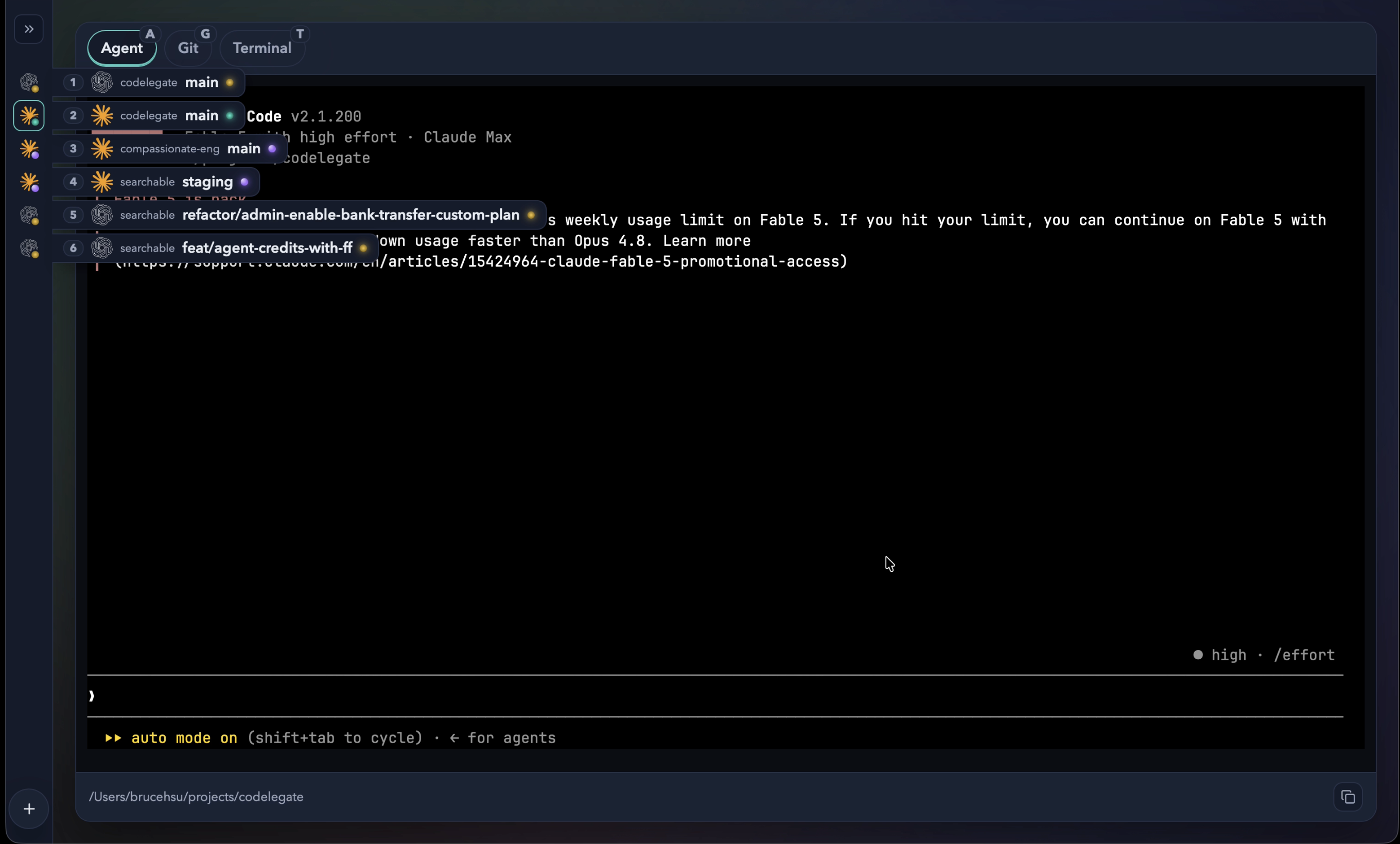
Collapse the sidebar into a slim rail with the chevron beside the search box, and each session shrinks to its agent icon and a status dot. A full workspace stays easy to scan, while the Agent, Terminal, and Git panes get room to breathe. Next time you open the app, the sidebar is right where you left it.
Sessions That Come to You
A collapsed rail doesn't mean losing track of what your sessions are up to. When a session changes status, its row slides out for a moment to show its repository and branch, then tucks back in. Hover an icon to peek at a single row, or hold the shortcut to fan them all out at once. A session that hits an error stays out until you acknowledge it, so a failure can't slip by unnoticed.
An Unread Light for Background Sessions
Each session's status light now doubles as an unread cue. When a session you're not focused on produces output, its light turns yellow to signal activity in the background, and it clears the instant you switch over. A busy agent in another tab never slips out of sight, whether the sidebar is open or collapsed.
Other Improvements
- Untracked folders with only a few files now expand in the diff view instead of showing an error.
- Factory.ai Droid CLI support has been removed.
v1.4.0
這個版本的重點全在側邊欄。它現在可以收合成一條窄軌,把更多空間留給你的面板;就算收起來,背景 session 也不會因此消失於視線之外:一有動靜,該列就會自動彈出,而全新的未讀燈號則會替你標示出:當你的注意力在別處時,悄悄產生輸出的 session。
可收合的側邊欄
點一下搜尋框旁的箭頭鈕,就能把側邊欄收合成一條窄軌,每個 session 也隨之縮小為 agent 圖示搭配一個狀態圓點。這樣一來,就算工作區塞滿 session 也能一眼掃視,Agent、Terminal 與 Git 面板則有了更寬裕的空間。下次開啟時,側邊欄會停在你上次離開時的樣子。
主動浮現的 session
收合成窄軌,不代表你就會漏掉各個 session 的動態。當某個 session 狀態一改變,該列便會短暫彈出,顯示所屬的 repo 與分支,接著自動收回。你也可以把滑鼠移到圖示上偷看某一列,或按住快捷鍵讓所有列一次全部攤開。至於遇到錯誤的 session,則會一直保持彈出,直到你確認為止,讓失誤不會悄悄溜過。
背景 session 的未讀燈號
每個 session 的狀態燈現在也兼作未讀提示。當你沒在使用的 session 產生輸出時,它的燈號會轉為黃色,提醒你背景有了動靜;一旦你切換過去,燈號隨即恢復。無論側邊欄是展開還是收合,另一個分頁裡忙碌的 agent 始終都在你的視線之內。
其他改善
- 只含少量檔案的未追蹤資料夾,現在會在差異檢視中展開,而不再顯示錯誤。
- 移除 Factory.ai Droid CLI 支援。