v1.2.0
The main change in this release is a redesign of the Git pane: instead of a single flat list of files, it now uses a two-column layout with a file tree on the left and the selected file's diff on the right, making it much more intuitive to browse and compare across large changesets. This release also adds support for Factory.ai's Droid CLI, giving you more flexibility in which agent to run.
The remaining changes are focused on making everyday operations smoother:
- Switching between sessions now remembers the pane you last had open instead of jumping back to the default.
- Untracked directories are now recognized correctly.
- After an amend, the Git pane returns to the correct commit state.
Download Codelegate v1.2.0 here
Git Pane Two-Column Redesign with a File Tree
The Git pane now uses a two-column layout: a file tree organized by directory structure on the left, and the actual diff for the selected file on the right. The tree is built on @pierre/trees and lists changes with natural sorting (numbers in filenames sort by value rather than lexically), color-coded by status for added, modified, deleted, and untracked entries, with a palette that follows the app's existing theme.
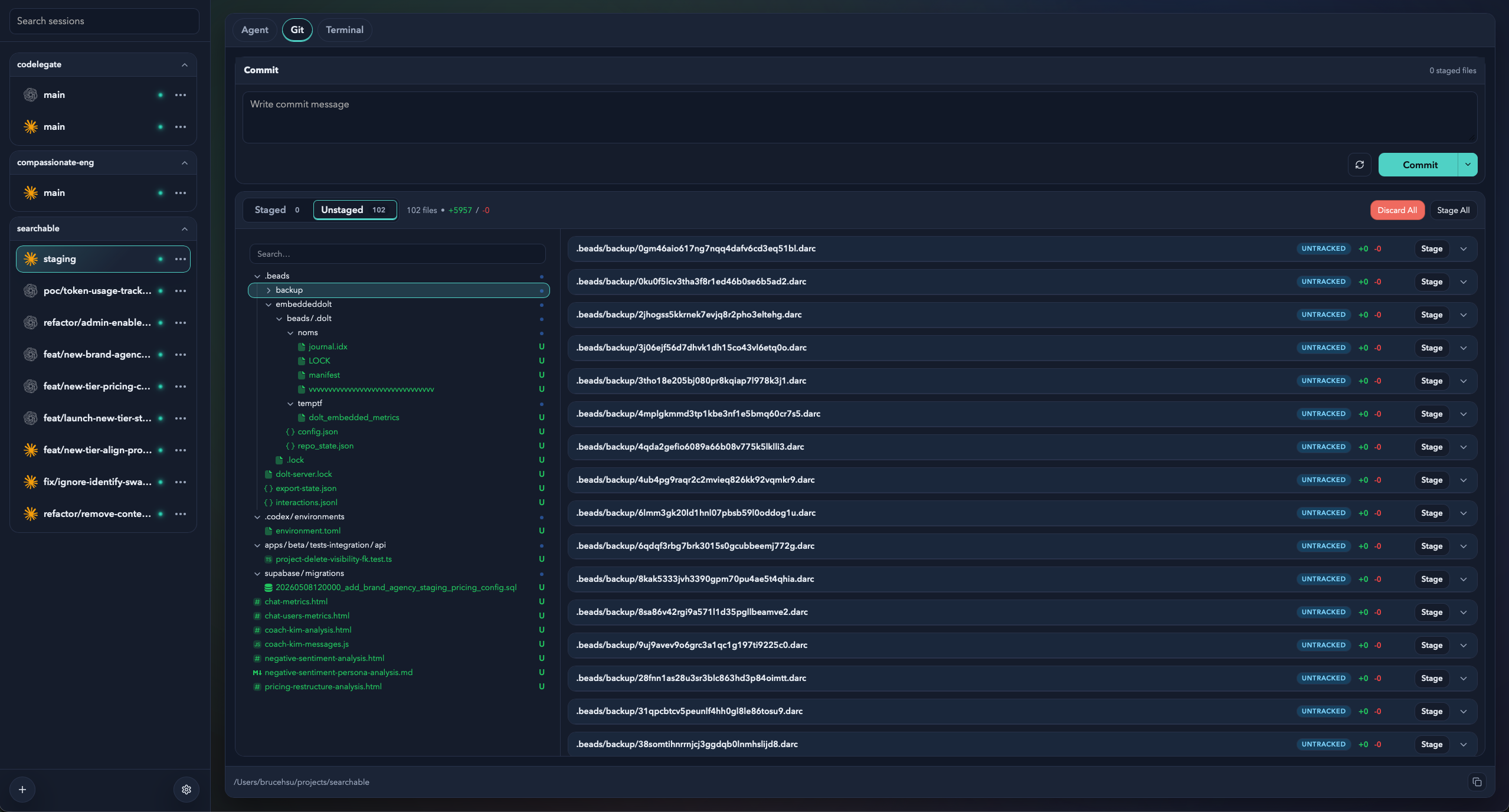
The left-hand tree can be freely resized by dragging. It defaults to 320px and clamps itself between a minimum width and a share of the pane, so the diff area on the right always keeps enough room to read comfortably.
Factory.ai Droid CLI Support
The agent picker now includes Factory.ai's Droid CLI, which can be launched in a session just like Claude Code and Codex CLI.
This release also adds agent detection: when you create a new session, each agent's command is checked against your login shell's PATH, so the picker reflects which agents are actually available in your environment and you avoid picking a tool that isn't installed yet.
Other Improvements
- Last focused pane memory: switching back to a session restores whichever Agent, Terminal, or Git pane that tab last had open, instead of always jumping back to the default. New sessions still start on the Agent pane.
- Proper untracked directory handling: the Git pane now recognizes untracked directories correctly and no longer produces a broken diff for a whole new directory.
- Amend state fix: after an amend, the Git pane resets correctly to that commit's state. Single-file stage/unstage now returns the latest change summary directly, including renames produced by the action, so the view updates more accurately.
v1.2.0
這個版本的主要改動是 Git 面板的重新設計:從原本單欄的扁平檔案清單,改為左側檔案樹、右側差異的雙欄式佈局,讓在大量檔案變動中瀏覽與比對更為直覺。除此之外也新增了 Factory.ai Droid CLI 的支援,讓 agent 的選擇更有彈性。
其餘的改動則集中在讓日常操作更順手:
- 切換 session 時會記住上次停留的面板,而不是每次跳回預設。
- 未追蹤的資料夾現在能被正確辨識。
- amend 之後 Git 面板會回到正確的 commit 狀態。
Git 面板雙欄式設計與檔案樹
Git 面板改為雙欄式佈局:左側是依目錄結構組織的檔案樹,右側則是選定檔案的實際差異。檔案樹採用 @pierre/trees 實作,會以自然排序(檔名中的數字會依數值大小排序而非字典序)列出變更,並依新增、修改、刪除、未追蹤等狀態以不同顏色標示,配色完全沿用 app 既有的主題。
左側檔案樹的寬度可以自由拖曳調整,預設為 320px,並會在最小寬度與面板比例之間自動收斂,確保右側差異區域永遠保有足夠的閱讀空間。
Factory.ai Droid CLI 支援
agent 選單新增了 Factory.ai 的 Droid CLI,可以和原本的 Claude Code 與 Codex CLI 一樣直接在 session 中啟動。
同時這個版本也加入了 agent 偵測:建立新 session 時會透過使用者的登入 shell 檢查各個 agent 指令是否存在於 PATH 中,讓選單能夠直接反映目前環境實際可用的 agent,避免選到尚未安裝的工具。
其他改善
- 記住上次聚焦的面板 :切換回某個 session 時,會還原該分頁上次停留的 Agent、Terminal 或 Git 面板,而不是每次都跳回預設面板;新建立的 session 仍以 Agent 面板為起點。
- 正確處理未追蹤的資料夾 :Git 面板現在會正確辨識未追蹤的資料夾,不再因為整包新目錄而出現異常的差異顯示。
- 修正 Amend 後的狀態 :執行 amend 後 Git 面板會正確重設至該 commit 的狀態;單檔的 stage/unstage 也改為直接回傳最新的變更摘要,包含因該操作而產生的檔案改名,讓畫面更新更精準。